

 2026/04/30
Hardware triggering in a scientific camera means using external electrical signals to control when image acquisition happens, instead of relying only on the camera’s internal timing or software commands. In practice, whenever the camera has to stay aligned with something else in the system, such as a light source, a laser, a stage, or another device.
In this article, we will explain what hardware triggering means, how trigger interfaces fit into it, which trigger signals cameras commonly use, and when this feature actually matters in real scientific imaging workflows. This matters because in many scientific imaging systems, image quality alone is not enough if the camera cannot stay aligned with the timing of the rest of the setup.
What Is Hardware Triggering in a Scientific Camera?
Hardware triggering is a method of controlling camera timing with external signals. Instead of letting the camera run only on its own internal clock, an outside signal tells the camera when to react. That signal is usually digital, meaning it switches between a low and a high voltage state to carry binary information. This is the most common form of triggering in scientific imaging systems because it is simple, fast, and well suited to synchronization between different pieces of hardware.
To understand hardware triggering clearly, it helps to separate the signal, the interface, and the camera behavior. The trigger signal is the electrical event itself. In many systems, the key event is the moment the signal changes state, which is called an edge. A rising edge happens when the signal changes from low to high, while a falling edge is the reverse. In other cases, the important factor is not just the moment of change, but how long the signal stays high or low. That is called the level of the signal. This difference matters because some camera functions react to an edge, while others depend on the duration of the level.
The trigger interface, by contrast, is simply the physical connection that carries that signal into or out of the camera. In other words, the interface tells you how the signal is connected, while hardware triggering tells you how the camera uses that signal to control timing. That distinction is important, because users often first notice “Trigger Interface” on a spec sheet, but what they really need to know is how the camera behaves once a trigger arrives. In a scientific imaging setup, hardware triggering is valuable because it turns image acquisition from an isolated camera action into part of a coordinated system event.
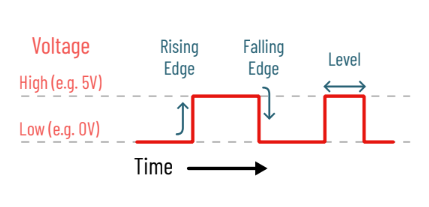
Figure 1: Illustration of triggering terminology
Hardware Trigger vs Software Trigger: What Is the Difference?
The main difference is where the timing signal comes from and how predictable that timing is. In a hardware-triggered setup, the camera reacts to an external electrical signal. In a software-triggered setup, the timing command comes through the computer and software environment instead. That difference affects how stable and repeatable the timing can be in real imaging workflows.
|
Aspect |
Hardware Trigger |
Software Trigger |
|
Timing source |
External device or electrical signal |
Software command from the computer |
|
Timing consistency |
More predictable |
More affected by software and system timing |
|
Best for |
Tight synchronization between devices |
General imaging with less strict timing needs |
|
Typical use cases |
Synchronized illumination, stage-based acquisition, repeated high-speed workflows |
Routine capture, basic sequence control, less timing-critical tasks |
|
Setup complexity |
Usually higher |
Usually simpler |
Software triggering is still useful in many imaging tasks, especially when strict synchronization is not required. It is often simpler to configure and can be fully adequate for routine acquisition. Hardware triggering becomes more valuable when timing stability directly affects the result, such as when a light source must fire only during exposure or when a camera should capture only after a stage reaches position.
What Do Trigger In and Trigger Out Actually Do?
Trigger In lets an external device control when the camera reacts, while Trigger Out lets the camera send timing information to other devices.
In practical terms, Trigger In is used when something outside the camera should decide when imaging happens. Depending on the camera, that may mean starting each frame with an incoming pulse, using the duration of a level signal to define exposure time, or delaying the start of a frame sequence until an external signal arrives. This is why Trigger In is common in systems where image acquisition has to follow an event, not just a software instruction. For example, a stage may finish moving and then send a trigger so the camera captures only when the sample is in position. In another setup, an experiment event or sensor signal may tell the camera exactly when to acquire the next frame.
Trigger Out works in the opposite direction. Here, the camera tells other hardware about its current state. That output can indicate events such as exposure, readout, or whether the camera is ready for the next frame. In a real system, that makes it possible for the camera to control the timing of a light source or another peripheral device. For instance, a light source can be driven only during the exposure period, or another device can wait until readout ends before taking its next action. Different cameras may offer different Trigger Out signals, but the core idea is the same: the camera shares timing status with the rest of the system.
What Trigger Interfaces Do Scientific Cameras Use?
A trigger interface is the physical connection used to carry trigger signals between the camera and external hardware. That is why camera spec sheets often list Trigger Interface as a separate item. It tells you how trigger signals are physically connected, not how the camera will behave once those signals arrive.
SMA Interfaces
SMA (short for SubMiniature version A) is a standard triggering interface based on a low-profile coaxial cable, very commonly used in imaging hardware. In practice, this makes SMA a good fit for users who want a clear, simple way to connect trigger signals between the camera and another device.
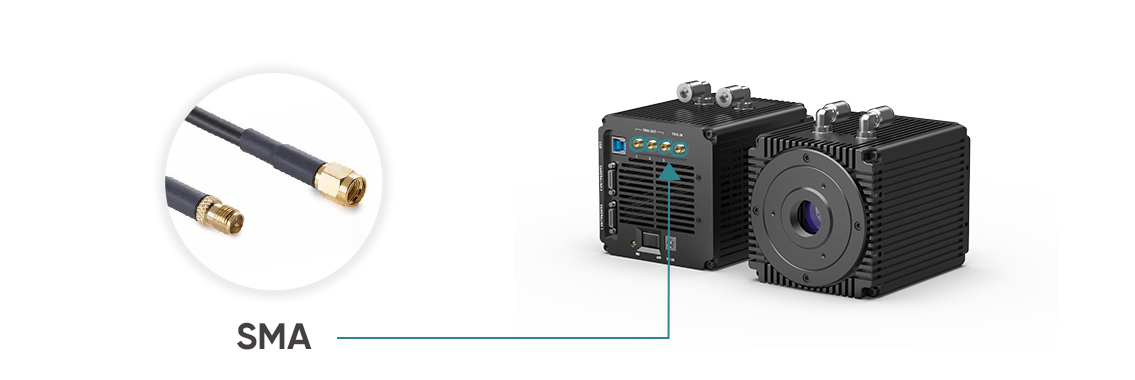
Figure 2: SMA interface in the Dhyana 95V2 sCMOS camera
Hirose Interfaces
Hirose is a multi-pin interface, providing multiple input or output signals via one single connection to the camera. Instead of using separate simple connections, a Hirose interface can carry multiple input and output signals through one multi-pin connector. That makes it useful in systems where a cleaner, more compact I/O design is preferred, especially when several trigger-related functions need to be handled together
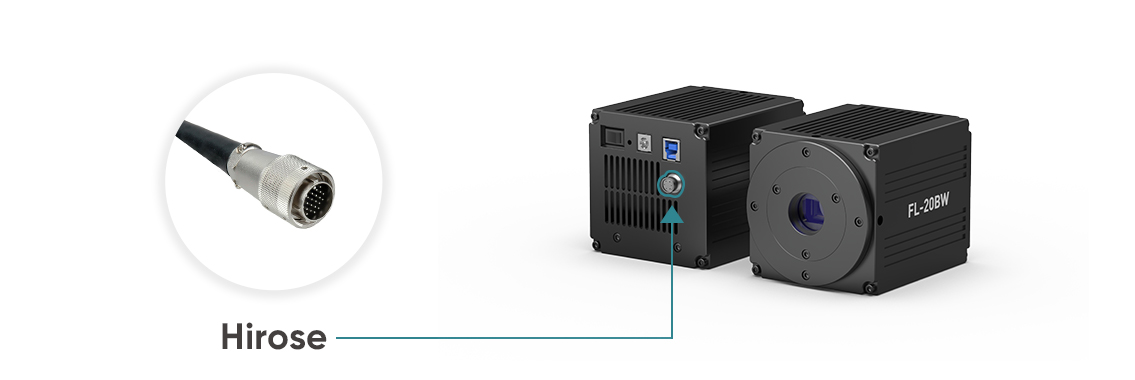
Figure 3: Hirose interface in the FL 20BW CMOS camera
CC1 and Other Specialized Interfaces
Some cameras use CC1 or other specialized trigger connections, especially in systems tied to particular data interfaces or camera architectures. CC1 is a specialized hardware triggering interface located on the PCI-E CameraLink card used by some cameras with CameraLink data interfaces. The interface type can vary with the camera design, the signal layout, and the broader hardware environment. So when you see “Trigger Interface” in a spec sheet, you should read it as part of the camera’s physical integration design, not as the full story of its triggering capability.
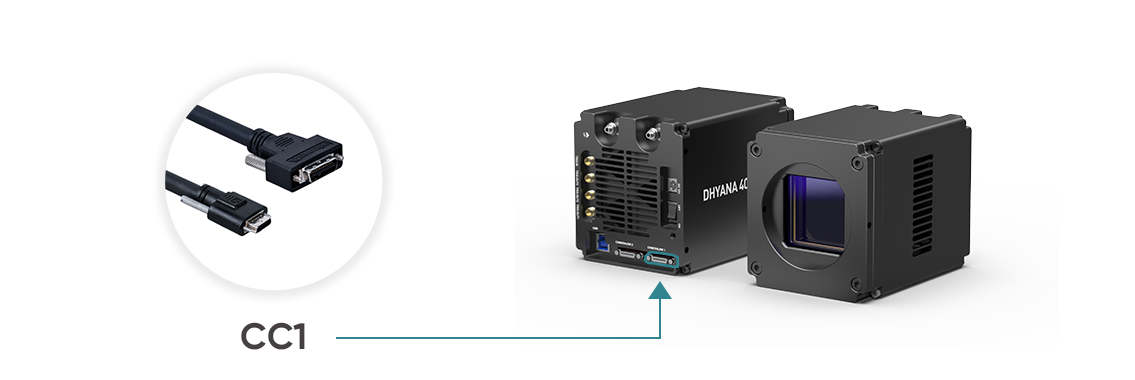
Figure 4: CC1 interface in the Dhyana 4040 sCMOS camera
When Do You Actually Need Hardware Triggering?
You usually need hardware triggering when image acquisition has to stay aligned with another device, event, or timing window. In other words, hardware triggering becomes important when the camera is not working alone, but as part of a coordinated system. The more your result depends on when an image is taken rather than simply whether an image is taken, the more likely it is that hardware triggering will be useful.
One common case is synchronized illumination. If a light source should turn on only during the camera’s exposure window, hardware triggering helps keep that timing clean and repeatable. This can reduce unnecessary illumination and lower the risk of timing mismatch between exposure and light output. Similar logic applies to laser-based systems, where precise control over illumination timing can matter even more.
Another clear case is motion stages and inspection workflows. If a stage, gantry, or other moving part needs to reach the correct position before the camera acquires a frame, hardware triggering helps ensure the camera reacts to the actual event instead of to a loosely timed software instruction. That makes it especially useful in scanning, inspection, and other motion-linked imaging tasks.
It also becomes more valuable in high-speed repeated acquisition. As timing cycles get faster and more repetitive, small delays and variation become harder to ignore. A stable hardware timing source is often a better fit for these workflows than software-only control. Finally, hardware triggering is often the safer choice in multi-device or multi-camera coordination, where cameras, light sources, stages, filter wheels, or other optical components all need to follow the same timing logic.
That said, hardware triggering is not automatically the top priority for every setup. If your workflow is mostly routine static imaging and does not depend on synchronization with external hardware, it may be useful to have, but it may not be the first feature you need to optimize.
What Timing Problems Can Happen in a Triggered Setup?
A triggered setup can still fail if the physical connection is correct but the timing logic is misunderstood. That is an important distinction. A camera may be properly connected to another device, but if the trigger arrives at the wrong moment, uses the wrong trigger mode, or refers to the wrong status signal, the system can still behave in ways that look inconsistent or unreliable. In many cases, the real problem is not the cable or connector. It is a misunderstanding of what the camera is ready to do at that point in time.
One common mistake is to mix up trigger interface with trigger mode. The interface tells you how the signal is physically connected, but it does not tell you whether the camera expects a frame trigger, a level-controlled exposure, or a triggered sequence. Another frequent issue is assuming that once a camera has Trigger In, it can always accept the next trigger immediately. In reality, a new trigger may arrive before the previous frame has fully finished, which can lead to missed triggers or unexpected timing behavior. That is why camera “ready” signals can matter in more tightly controlled systems.
It is also easy to focus only on exposure time and forget that readout timing still matters. The camera may still be reading out a frame even after exposure has ended. On rolling shutter cameras, timing can become even more confusing because different Trigger Out signals may refer to different exposure-related events, such as exposure of any row, the first row, or a pseudo-global interval. Finally, users sometimes assume a Trigger Out signal always means the same thing across cameras, when in fact the output may indicate exposure, readout, or readiness depending on the system. Good triggering is not just about sending a pulse. It is about understanding exactly what event that pulse represents.
Conclusion
Hardware triggering is most valuable when a scientific camera has to work as part of a timed system rather than as a standalone imaging device. The trigger interface tells you how signals are physically connected, but the real value of hardware triggering lies in how well the camera can respond to, share, and coordinate timing across the rest of the setup.
If you are evaluating a camera for synchronized imaging, it is worth looking at trigger capability as part of the full workflow rather than as an isolated spec-sheet item. Across the Tucsen lineup, trigger support becomes especially important in applications that depend on precise coordination between the camera and other hardware.
FAQs
Can a camera use both Trigger In and Trigger Out in the same system?
Yes. A camera can receive a Trigger In signal from one device and send a Trigger Out signal to another. In practice, both are often used together in the same synchronized system.
Does hardware triggering work the same way on rolling shutter and global shutter cameras?
Not always. The basic idea is the same, but the timing meaning of trigger signals can differ, especially on rolling shutter cameras. When timing is critical, you need to confirm what each trigger signal actually represents on that model.
What should I check besides Trigger Interface on a camera spec sheet?
Check whether the camera supports Trigger In, Trigger Out, and the trigger modes your workflow needs. It is also helpful to confirm what output states the camera can report, such as exposure, readout, or ready signals.
Tucsen Photonics Co., Ltd. All rights reserved. When citing, please acknowledge the source: www.tucsen.com


