

 2026/04/27
Choosing a camera is not only about sensor size, resolution, or sensitivity. The optical interface matters too. It determines how the camera connects to a lens, microscope, or other imaging system, and that choice can affect compatibility, usable field of view, and whether the full sensor area can actually be used.
In many camera systems setups, the most common optical interfaces are C-mount, F-mount, and M42. At first glance, they may seem like simple mechanical differences. In practice, they can shape how easily a camera fits into an existing system, how much flexibility you have when selecting optics, and whether your setup can support larger sensors without limitations.
In this guide, we will look at the role of optical interfaces in cameras, explain the differences between C-mount, F-mount, and M42, and help you understand which option makes the most sense for your imaging system.
What Is an Optical Interface in a camera?
An optical interface in a camera is the mechanical connection between the camera and the optical system it works with. In many cases, people also refer to it as the camera mount.
This interface is what allows the camera to attach to a lens, a microscope, a relay optic, or another imaging component in the system. On the surface, that may sound like a simple hardware detail. In reality, it plays a much bigger role in how well the whole imaging setup works.
A camera optical interface affects more than whether two parts can be physically joined. It also influences alignment, spacing, compatibility with existing optics, and how effectively the camera sensor can be used.
That is why optical interfaces should be treated as part of overall system design, not just a mounting detail. When you choose the right interface early, it becomes much easier to build a setup that is stable, compatible, and better matched to your imaging goals.
What Are the Most Common Optical Interfaces Used in cameras?
The most common optical interfaces used in cameras are C-mount, F-mount, and M42. Each one has its own mechanical standard, typical use cases, and practical limits, so the right choice depends on the sensor format and the optical system around it.
C-Mount
C-mount is the most common standard for scientific and industrial cameras. It is based on a 1-inch, 25.4 mm screw thread, with the camera using the female side of the mount. Because it is widely supported across camera systems systems, C-mount is often the default choice for routine microscopy, machine vision, and many general-purpose camera setups.
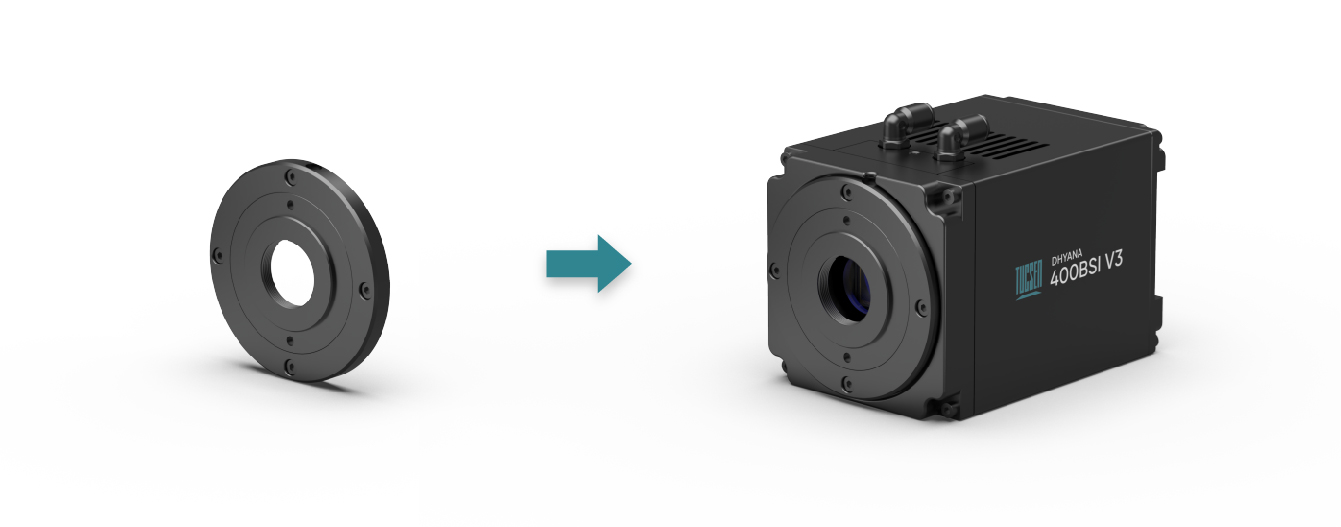
Figure 1: C-mount in the Dhyana 400BSI V3 sCMOS camera
Its main advantage is how common and easy to integrate it is. Many cameras, lenses, and adapters are built around this standard, which makes system matching more straightforward in standard applications.
However, C-mount can become a limitation in large-format cameras. In those cases, it may restrict the effective sensor area and typically supports up to a 22 mm diagonal field of view. That means a camera may fit mechanically, but still fail to use the full sensor efficiently.
F-Mount
For larger formats, F-mount is another common standard in cameras. It is based on a three-lug bayonet mount and supports up to a 44 mm maximum diagonal field of view.
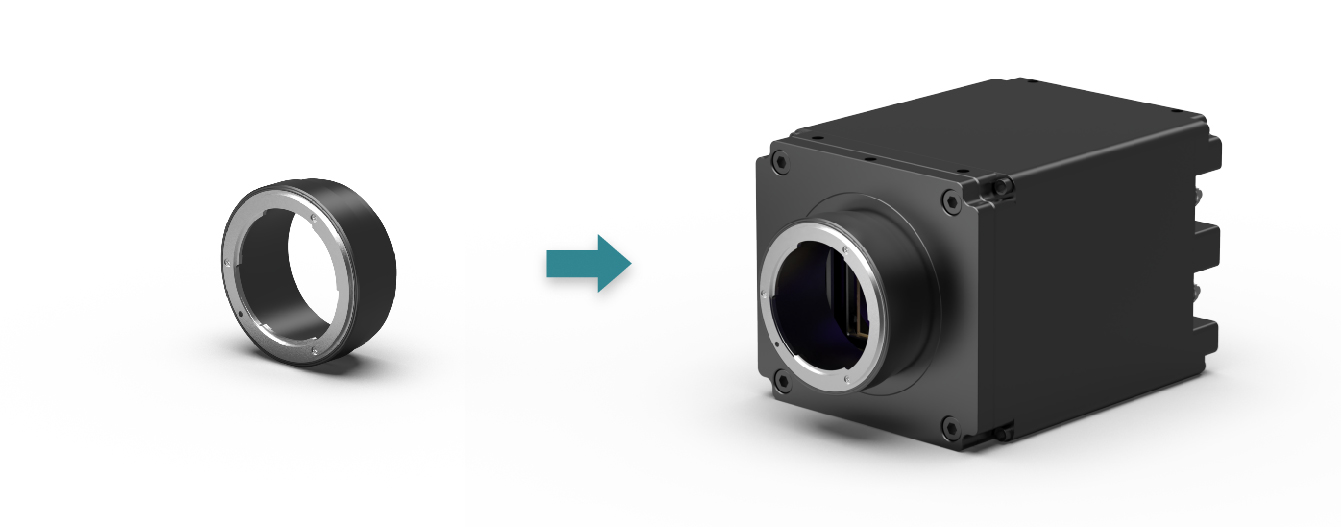
Figure 2: F-mount in the Dhyana 4040 sCMOS camera
Compared with C-mount, F-mount is better suited to systems that need broader optical coverage or larger sensor support. This makes it a stronger option when the imaging setup goes beyond the range that a smaller interface can comfortably handle.
In practical terms, F-mount is often the better fit when sensor size and usable image area become more important than compactness or standard convenience.
M42
M42 is also available on some cameras. It is based on a 42 mm screw thread and is a common standard in photography cameras and lenses.
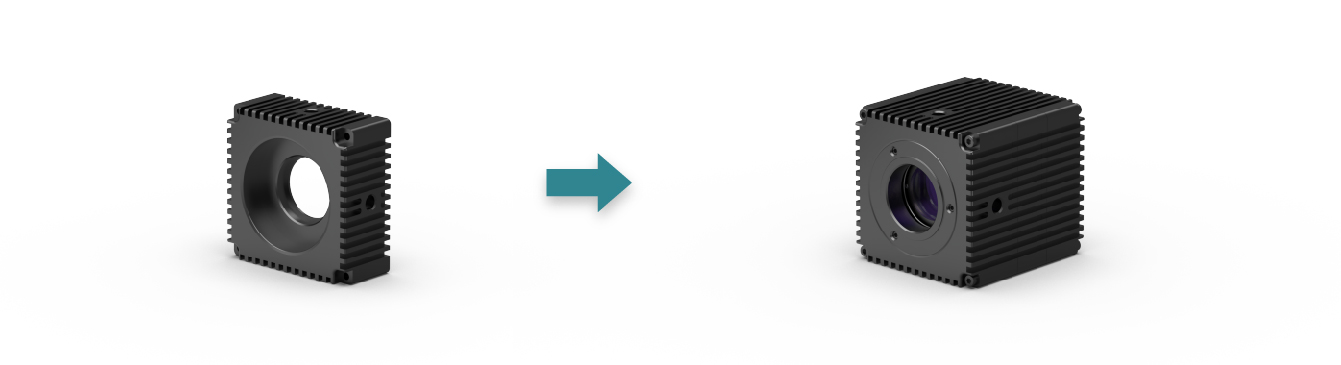
Figure 3: M42 mount in the Dhyana 401D sCMOS camera
In camera systems, M42 can be useful in adapted systems, customized optical paths, or setups that benefit from compatibility with thread-based optical components. It is not always the first choice in routine systems, but it can be a practical option in the right configuration.
Customized Mounting Options
Some scientific cameras also offer complete customization over the mounting mechanism. This can be useful in OEM projects, specialized research systems, or integration environments where standard interfaces do not match the optical or mechanical requirements of the application.
In those cases, a customized mount can make system integration easier, but it also requires a clearer understanding of spacing, optical alignment, and compatibility across the full setup.
Quick Comparison
|
Interface |
Mount Type |
Typical Use |
Main Strength |
Main Limitation |
|
C-mount |
1-inch / 25.4 mm screw thread |
Routine scientific and industrial imaging |
Common, practical, widely supported |
Can limit large-format CMOS systems |
|
F-mount |
Three-lug bayonet mount |
Larger-format camera systems |
Supports wider sensor coverage |
Less necessary for smaller standard setups |
|
M42 |
42 mm screw thread |
Adapted or customized optical systems |
Useful with thread-based optical components |
Needs careful system-level compatibility checks |
|
Customized mounts |
Application-specific |
OEM and specialized integration |
Greater design flexibility |
Requires more system planning |
How Does the Camera Mount Affect Field of View and Sensor Coverage?
The camera mount affects field of view and sensor coverage because not every optical interface can fully support every sensor format. A camera may fit mechanically, but that does not always mean the optical system can deliver an image circle large enough to use the full sensor area effectively.
This becomes more important as sensor size increases. In a smaller or more routine setup, the mount may not create obvious limitations. But in large-format CMOS cameras, a smaller interface can restrict the usable image area and reduce the effective field of view.
For example, a camera may connect correctly to the optical system, yet the setup may still illuminate only part of the sensor. In that case, the full sensor area is not being used, and the effective field of view may be reduced.
That is why camera mount selection should not be treated as a mechanical detail alone. It should be evaluated together with sensor size, optical coverage, and the field of view the system is expected to deliver.
The right optical interface depends on your sensor size, optical setup, required field of view, and how much flexibility the system needs. There is no single best option for every camera application. The best choice is the one that fits the full imaging system without creating unnecessary limits later.
For Standard and Routine Imaging Setups
In many routine imaging systems, C-mount is often the most practical choice. It is widely used, easy to integrate, and well suited to standard scientific and industrial applications where the sensor format and optical path do not demand especially large coverage.
For many users, the main advantage is simplicity. If the system already uses common adapters, microscope ports, or lenses built around C-mount, it can be the most efficient option.
For Larger Sensors and Wider Image Coverage
When the camera uses a larger sensor or the application requires a wider usable field, a larger interface may make more sense. In these cases, F-mount or M42 can be better options because they are more suitable for systems that need greater optical coverage.
This is especially important when avoiding incomplete sensor usage becomes a priority. A mount that works in a smaller setup may become restrictive once the imaging system moves to a larger-format sensor.
For Existing or Legacy Optical Systems
Sometimes the right choice is shaped less by the camera and more by the optical system that is already in place. If a lab or imaging platform is built around a specific lens standard, microscope adapter, or threaded optical path, the most practical interface is often the one that fits the existing setup with the fewest compromises.
In these situations, compatibility across the full optical path matters more than choosing the most common mount on paper.
For Customized or OEM Integration
In OEM projects or specialized imaging systems, a standard interface may not always be the best answer. Some applications benefit from customized mounting solutions that better match the mechanical and optical requirements of the system.
This approach can offer more design flexibility, but it also requires more planning. Mount selection needs to be considered together with spacing, alignment, sensor coverage, and long-term integration goals.
What Problems Can the Wrong Optical Interface Cause?
The wrong optical interface can create problems beyond simple mounting mismatch. It can affect system stability, increase integration difficulty, and make the imaging setup harder to use reliably over time.
One common issue is focus or spacing error. Even when a camera can be attached to an optical system, the overall setup may still fall short if the spacing is not correct. This can reduce performance and make it harder to achieve the intended imaging result.
A poor interface choice can also lead to extra adapter use. In some cases, the system may still work, but only after adding more mechanical components to bridge compatibility gaps. That can make the optical path more complex and leave more room for alignment issues or long-term instability.
Another problem is reduced flexibility. A mount that fits the current setup may limit future changes in lenses, optical accessories, or sensor format. This can make upgrades more difficult and force unnecessary compromises later.
In some systems, the wrong interface may also contribute to optical limitations such as vignetting or incomplete sensor usage. However, these issues are usually part of a broader mismatch between the camera, the optics, and the intended field of view.
In short, the wrong optical interface can reduce reliability, increase integration effort, and make the system less adaptable. That is why mount selection should be treated as part of overall system planning, not as a final mechanical detail.
Conclusion
Choosing the right optical interface helps ensure that a camera fits the optical system mechanically and performs as expected in practice.
C-mount, F-mount, and M42 each have their own strengths, and the right choice depends on the sensor format, optical path, and overall requirements of the system. In many cases, choosing the right interface early can help avoid integration problems, reduce wasted sensor area, and make the full imaging setup more effective.
If you are evaluating a camera for microscopy, large-format imaging, or customized system integration, it is worth looking beyond the sensor alone and considering how the optical interface fits your application. Tucsen offers camera solutions designed for a range of optical systems and imaging requirements, helping users build setups that are better matched from the start.
FAQs
Is C-mount enough for all cameras?
No, C-mount is not enough for all cameras. It works well in many standard imaging setups, but it can become limiting when a system uses a larger sensor or needs broader optical coverage. In those cases, a larger interface may be a better fit.
What is the difference between M42 and T-mount?
M42 and T-mount are different thread standards, even though they may look similar. They should not be treated as interchangeable without checking the specifications. In camera systems, that difference can affect compatibility and spacing.
Can adapters solve all camera mount compatibility issues?
No, adapters cannot solve every compatibility issue. They may help connect components mechanically, but they do not guarantee proper focus, full sensor coverage, or the right image circle. The full optical path still needs to be checked.
Can one camera mount work with every lens or microscope?
No, one camera mount cannot work with every lens or microscope. Compatibility depends on the full optical system, including spacing, sensor format, and optical coverage.
Tucsen Photonics Co., Ltd. All rights reserved. When citing, please acknowledge the source: www.tucsen.com


